


Welcome back to our Indispensable Azure Tools series. This time, we’re exploring the Azure Developer CLI, better known as azd, a tool that has quietly become one of the most practical ways for teams to build, deploy and manage cloud-native applications on Azure.
Local meets cloud
For many IT teams, the biggest challenge in cloud development is the gap between writing code and running that code reliably in Azure. Local environments rarely match production. Provisioning cloud resources by hand is slow and inconsistent, Pipelines drift, documentation becomes outdated. The Azure Developer CLI was created to solve exactly these problems in a way that feels natural for developers and predictable for ops.

Initialize your project, run azd init in a terminal and scan your current directory or select a template
At its core, azd brings the application, the infrastructure and the deployment process together. Instead of hopping between scripts, portals and templates, you work from a single project structure that defines your code, your Azure resources and the operational steps needed to deploy everything end to end.
Provisioning made easy
A few things stand out when you begin using azd. Setting up a new project is quick. You can bootstrap complete application architectures from curated templates and instantly get a local environment that mirrors the cloud setup. The tool handles provisioning using Bicep or Terraform, integrates naturally with GitHub Actions and Azure DevOps and manages configuration across multiple environments such as dev, test and production without turning the project into a maze of parameter files.
Azure Deployment Environments
Azd also integrates with Azure Deployment Environments. This makes it possible to create consistent, centrally governed development environments from inside your project workflow. Instead of each developer setting up their own stack manually, ADE can provision secure, policy-aligned environments on demand and azd handles the application deployment on top of them. It reduces drift, shortens onboarding and ensures that environments follow the same organisational guardrails as production.
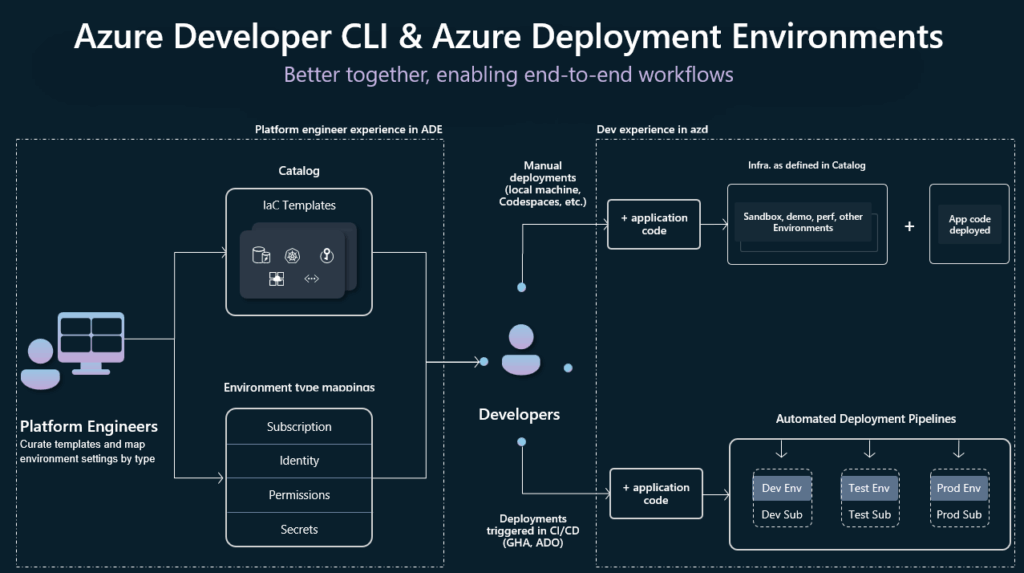
For teams working in larger organisations or regulated industries, this combination of azd and ADE can remove a surprising amount of friction from day-to-day development.
Because azd is designed with real-world application patterns in mind, it supports modern cloud development out of the box. This includes containerised workloads, Functions, App Service, databases, messaging, Key Vault integration, distributed tracing and application logging. You get a development workflow where infrastructure and application code move together rather than drifting apart.
Templates!
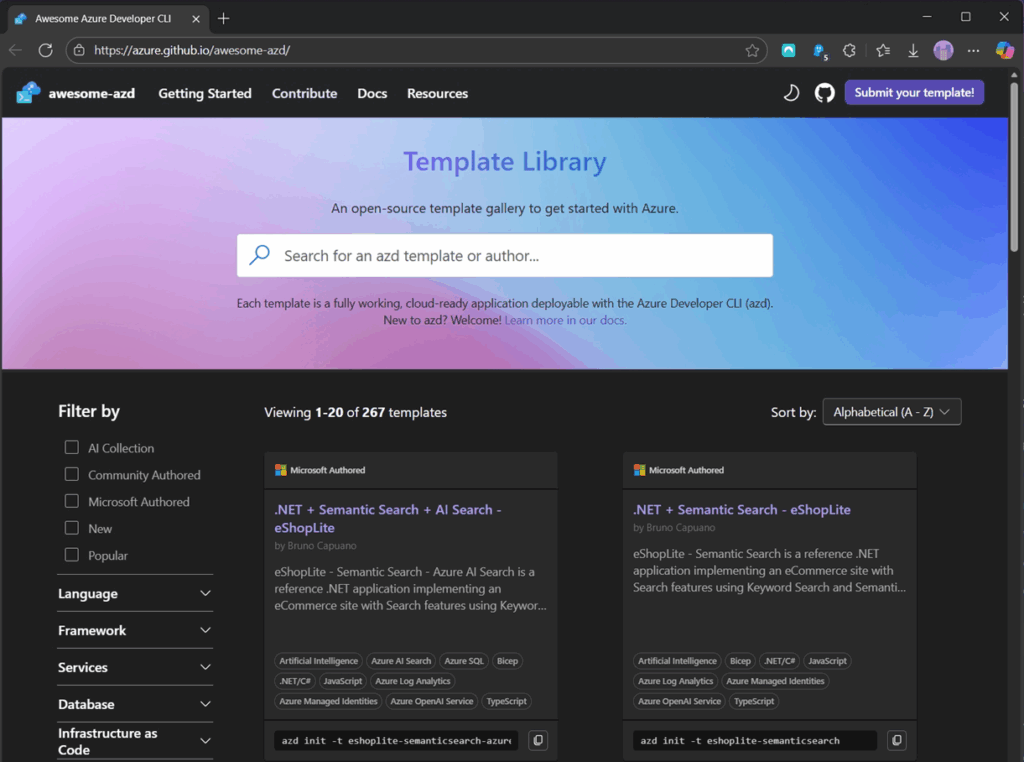
The template ecosystem has grown quickly. From the official Microsoft samples to the community collections on GitHub and the Awesome AZD catalogue, you can start with working solutions for microservices, event-driven architectures, web apps, chatbots and data processing workloads. These templates are not just simple examples but full project starters with CI/CD, IaC and solid production patterns already included.
14 pages of open-source templates to get started with Azure.
Each template is a fully working, cloud-ready application deployable with the Azure Developer CLI.
Another strong point is environment management. With azd you can switch between environments and run the same deployment commands without worrying about mismatched settings. It keeps secrets handled securely, aligns configuration across services and makes it easier to keep development and production behaviour consistent. Teams that struggle with manual environment setup often see an immediate improvement here.
VS Code
Azd also plays well with the tools developers already use. It integrates with VS Code, offers GitHub Codespaces support and provides structured telemetry that helps diagnose issues across distributed applications. As the tool continues to evolve, the recent updates show that Microsoft is investing heavily in making cloud application development more approachable and more repeatable.
For DevOps teams, the real value is that azd helps enforce good practices without forcing a heavy process. Infrastructure as Code becomes the default. Pipelines stay clean and predictable. Deployments work the same way for everyone on the team. Most importantly, it lowers the barrier for consistent application delivery in Azure, which is what makes it an indispensable tool in our series.
This post is part of the Indispensable Azure Tools series by DevOps Masterminds. Explore the full series here.
Stay tuned as we continue to highlight the tools that make building on Azure smarter, faster, and easier to manage.